Category: Technology

  • AI Code Assistants 2025

    Ai code
    Ai Code

    1. GitHub Copilot

    Overview & Integration
    Developed by GitHub and OpenAI, Copilot is deeply integrated into popular IDEs like VS Code, JetBrains, and Visual Studio is Ai code.

    Strengths

    • Excellent autocomplete for functions and boilerplate, with around 43% first‑try accuracy in Python .
    • Offers full‑function generation and even entire algorithms.
    • Speeds up development by ~56% in JavaScript tasks.

    Limitations

    • Reliant on internet/cloud — may raise privacy/performance concerns .
    • Accuracy varies; complex tasks decrease effectiveness.

    2. Tabnine

    Overview & Integration
    Tel Aviv–based, Tabnine provides AI code completion across 80+ languages and major IDEs, supporting both cloud and local models .

    Strengths

    • Local model option improves privacy and speed .
    • Supports test‑generation, documentation, debugging via chat.
    • Widely adopted: ~1 M users, 10 M installs .

    Limitations

    • Autocomplete not as sophisticated as Copilot in generating multi-line code.

    3. Amazon CodeWhispere

    Overview & Integration
    Though covered in some comparative reviews, it’s less prominent than Copilot or Tabnine.

    • In one academic study, correct code generation accuracy was ~31% vs Copilot’s 46% and ChatGPT’s 65%.

    Strengths

    • Prioritizes security and bug detection.
    • Integrates well into AWS ecosystem and CLI tools.

    Limitations

    • Lagging in raw accuracy compared to other major tools

    4. Codeium (Windsurf) & Replit Ghostwriter

    Overview
    These tools target mostly free and open‑source ecosystems.
    Comparisons typically position them just behind Copilot and Tabnine.

    ai
    Ai codeing

    Strengths

    • Codeium is efficient and privacy-friendly.
    • Ghostwriter excels in browser/IDE integration for Python and JS.

    Limitations

    • Lacking in advanced features like robust test generation and refactoring.

    5. Claude Code (Anthropic)

    Overview
    A newer terminal-first AI agent by Anthropic, designed for command-line workflows.
    Reported strong performance in agentic workflows and reasoning-heavy tasks.

    Strengths

    • Ideal for natural‑language commands, Git, multi‑step workflows.
    • Strong code reasoning and explanation.

    Limitations

    • Primarily targeted at terminal users; may lack deep IDE plugin support.

    Feature Comparison Chart

    Here’s a simplified view of how these tools stack up by major criteria:

    FeatureCopilotTabnineCodeWhispererCodeium/GhostwriterClaude Code
    IDE IntegrationExcellentExcellentGoodGoodLimited (terminal)
    Cloud or LocalCloud onlyCloud/LocalCloudCloudCloud
    Code GenerationStrongModerateModerateModerateStrong reasoning
    Test & RefactorGoodGoodFairBasicStrong (terminal)
    PrivacyLowHigh (local)MediumMediumMedium
    Performance Accuracy≈46% @HumanEval*Moderate≈31% @HumanEvalModerateN/A per study

    📈 Which Tool Should You Choose?

    1. For full IDE integration + productivity boostGitHub Copilot
      • Cuts development time up to 55%. Ideal for frequent function generation and multi-language support.
    2. For privacy-sensitive or offline workTabnine
      • Local models mean no cloud data sharing; strong across languages.
    3. For secure AWS-focused environmentsCodeWhisperer
      • AWS-friendly with built-in security scanning, though accuracy is lower.
    4. For lightweight OSS workflowsCodeium / Ghostwriter
      • Good free options with solid basic suggestions and broad language support.
    5. For terminal-first, reasoning-based code tasksClaude Code
      • Ideal if you prefer natural-language, terminal-based workflows, extensive explanations and git management.
    ai
    AI

    Tips for Getting the Most Out of AI Assistants

    • Prompt precisely: Clear English comments (e.g., “generate unit test for function X”) yield better results.
    • Review generated code: AIs aren’t perfect—always check logic, security, licensing.
    • Combine tools: Example: use Tabnine for local autocompletion, Copilot for heavy lifting, and Claude for reasoning tasks.

    📷 Visual Deep Dive & Chart

    The image above provides a snapshot comparison of Claude, Copilot, and Google Jules—a recent chart showing their performance across reasoning, multi-language support, and integration depth.

    🏁 Final Verdict

    There’s no one-size-fits-all best AI code assistant—each tool excels under different conditions:

    • Pick Copilot for comprehensive IDE support and fast code generation.
    • Use Tabnine if you prioritize privacy or need offline capabilities.
    • Go with CodeWhisperer when you’re in AWS envs and need secure scanning.
    • Try Codeium or Ghostwriter for budget-friendly, general-purpose use.
    • Opt for Claude Code if you’re terminal-centric and crave high reasoning ability.
  • The Art of Prompt Engineering

    Prompt Engineering
    Prompt Engineering

    Prompt engineering is the art and science of crafting inputs (called prompts) to get optimal outputs from AI models like ChatGPT, DALL·E, or Codex. It’s especially important when working with large language models (LLMs) because their behavior is highly sensitive to how you phrase your request.

    What is Prompt Engineering?

    At its core, prompt engineering is about:

    • Understanding the model’s behavior
    • Designing precise, clear, and structured prompts
    • Iterating and refining prompts to achieve better, more reliable results

    When is Prompt Engineering Useful?

    Prompt engineering can significantly improve outcomes in tasks like:

    • Content creation (blogs, marketing copy)
    • Code generation and debugging
    • Summarization or translation
    • Data analysis and transformation
    • Design and image generation
    • Education and tutoring
    • Chatbot design
    • Automating workflows
    Prompt
    Prompt Engineering with ai in chatgpt

    Core Techniques of Prompt Engineering

    1. Be Specific and Clear

    ✅ Good:

    “Write a 100-word blog introduction about the benefits of meditation for busy professionals.”

    🚫 Bad:

    “Write about meditation.”

    2. Give Examples (Few-shot Learning)

    You can show the model a few examples of what you want:

    txtCopyEditInput: "I’m hungry"  
    Output: Emotion: Hunger
    
    Input: "I miss my family"  
    Output: Emotion: Loneliness
    
    Input: "I can't wait for the weekend!"  
    Output:
    

    3. Role Prompting (Set a Persona or Role)

    You can ask the model to act as someone:

    “You are a professional CV writer. Improve the following CV summary to be more impactful and concise.”

    4. Chain-of-Thought Prompting (Step-by-Step Reasoning

    Ask the model to reason through a problem in steps.

    “Solve this math problem step by step: A train travels 300 km at 60 km/h. How long does it take?”

    5. Instructional Promptin

    Be direct and use commands:

    “Summarize this article in three bullet points.”

    “List five benefits of regular exercise.”

    6. Using Constraints

    Add constraints like length, format, or style:

    “Generate a 2-line poem about the sea in the style of Shakespeare.”

    prompt
    Prompt Engineering Technique

    7. Zero-shot vs. Few-shot vs. CoT

    TypeDescriptionExample
    Zero-shotNo examples; straight instruction“Translate ‘hello’ to French.”
    Few-shotProvide examples in the promptSee emotion detection example above
    Chain-of-thoughtAsk the model to think step-by-step“Explain how you got to your answer step-by-step.”

    🧪 How to Use Prompt Engineering in Practice

    Tools You Can Use:

    1. ChatGPT / GPT-4 / GPT-4.5 (this platform)
      • Craft prompts directly in the chat.
      • Use the “Custom Instructions” feature for persistent context.
    2. OpenAI Playground
      • Offers temperature, top-p, frequency penalties — great for testing.
    3. Notebooks (Python + OpenAI API)
      • Use openai Python SDK to automate and test prompt variations.
    4. Tools like LangChain, LlamaIndex, or RAG setups
      • Use prompts dynamically in apps that retrieve and augment knowledge.

    💡 Best Practices

    • Start simple, then iterate
    • Use delimiters (like """, ---) to separate instructions and inputs
    • Test multiple variants of prompts
    • Save and document your best prompts
    • Measure output quality for consistency and reliability

    📘 Example Prompt Recipes

    Summarizer Prompt:

    “Summarize the following text in 3 bullet points: \n\n[TEXT]”

    Email Writer Prompt:

    “Write a professional follow-up email to a client named Sara, reminding her about our meeting scheduled on Friday.”

    Code Explainer Prompt:

    “You are a senior software engineer. Explain what this code does in plain English: \n\n[CODE]”

  • AI Vocal Remover 2025 | How Works ?

    ai vocal remover
    Ai vocal Remover

    What is an AI Vocal Remover?

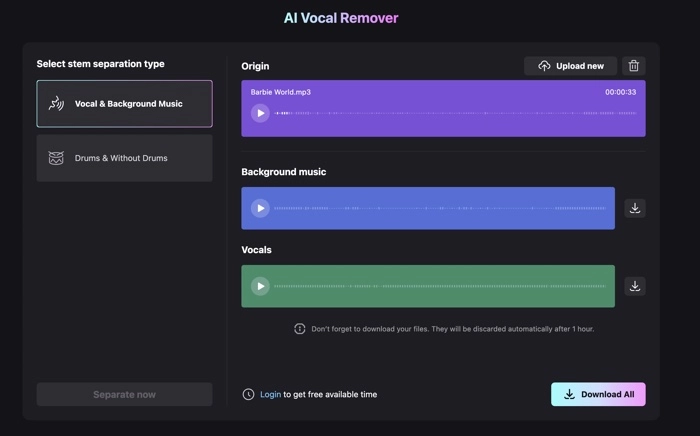
    An AI Vocal Remover is a software tool that uses artificial intelligence (AI) and machine learning algorithms to separate vocals from instrumental tracks in audio files.

    It is commonly used in music production, karaoke creation, remixing, and audio editing. The tool “isolates” or “removes” the vocal component from a mixed audio file (like MP3, WAV, etc.), leaving behind the instrumental version (or vice versa).

    How Does It Work?

    Traditional audio separation is complex because audio tracks are mixed down into two channels (stereo). Human ears can distinguish between instruments and voices due to brain processing, but for computers, this requires signal processing and AI.

    Steps Involved in AI Vocal Removal:

    1. Audio Input:
      • A stereo or mono audio file is uploaded.
    2. Source Separation:
      • AI models like Spleeter (by Deezer), Demucs, or custom deep learning models analyze the sound wave.
      • These models are trained on thousands of songs where they learned patterns to differentiate between vocals, drums, bass, and other instruments.
    3. Spectrogram Analysis:
      • The tool converts the audio into a spectrogram (visual representation of frequencies over time).
      • AI identifies and separates frequency patterns typical of vocals vs. instruments.
    4. Isolation or Removal:
      • The vocal track is extracted or suppressed based on user intent.
      • Two output files are created:
        • Isolated vocals (acapella)
        • Instrumental (karaoke)
    Vocal remover
    Ai vocal Remover

    Diagram: AI Vocal Remover Workflow

    • The diagram shows how an audio input is processed into two separate outputs: vocals and instrumentals using AI algorithms.

    Popular AI Vocal Remover Tools

    Tool NamePlatformFeaturesFree Version
    Moises.aiWeb, Android, iOSSplit into 2/4/5 stems, pitch changerYes
    Vocal RemoverWebReal-time vocal/instrumental splitYes
    Spleeter by DeezerOpen-sourceMulti-stem separation, customizableYes
    LALAL.AIWebHigh-quality stem splittingLimited free
    DemucsGitHubPyTorch-based audio source separatorYes

    Use Cases of AI Vocal Remover

    1. Karaoke Creation

    • Remove vocals to generate a karaoke version for singing practice or performance.

    2. Remixing and Sampling

    • Extract acapella for mashups, remixes, or DJ mixes.

    3. Music Education

    • Isolate instruments (e.g., bass, drums) to study individual components.

    4. Podcast or Interview Editing

    • Remove background music to focus on dialogue.

    5. Noise Reduction

    • In some cases, used to separate noise from speech for cleaner audio.

    Benefits of Using AI Vocal Removers

    BenefitDescription
    Fast & AccurateProcesses in seconds with high accuracy.
    No Need for Studio FilesWorks even if you don’t have access to original stems.
    FlexibleYou can choose to remove vocals or isolate them.
    Cloud-Based OptionsNo need for high-performance computers.

    Limitations and Challenges

    LimitationExplanation
    Artifacts or DistortionSome tools may leave behind “ghost” vocals or muffled sounds.
    Performance Depends on QualityWorks best on high-quality stereo tracks.
    Not Perfect for All GenresComplex genres like heavy metal or jazz may not isolate perfectly.
    Processing TimeLarge files may take more time and resources to process.

    Chart: Vocal Removal Accuracy by Too

    ToolAccuracy (out of 10)SpeedOutput Quality
    Moises.ai9.5FastExcellent
    LALAL.AI9.0MediumVery Good
    Spleeter8.5FastGood
    Demucs9.0SlowVery Good
    VocalRemover8.0FastModerate
    image 10 image 10

    Future of AI Vocal Removers

    With ongoing improvements in AI, especially in the area of deep learning and audio modeling, we can expect:

    • Real-time vocal separation during live performance.
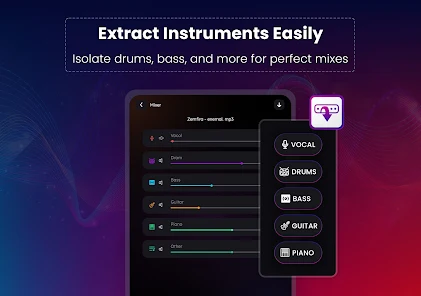
    • Multi-stem separation (vocals, bass, drums, piano, guitar).
    • Integration with music production software like FL Studio, Ableton Live.

    Conclusion

    AI vocal removers are transforming how people interact with music. Whether you’re a professional producer, a karaoke lover, or a student of music, these tools offer a practical and powerful way to manipulate audio.

    As AI continues to evolve, the precision and real-time capabilities of vocal removal will improve, making music editing more accessible than ever.

  • AI Image Enhancer| How Works 2025

    Image enhancer
    Image Enhancer

    AI Image Enhancer: Visual Comparison

    AI image enhancers utilize advanced algorithms to upscale, denoise, and restore images, significantly improving clarity and detail. Below are examples demonstrating the enhancements.

    An AI image enhancer is a tool or application that uses artificial intelligence to automatically improve the quality, resolution, or visual appeal of an image. These tools are widely used for:

    • Upscaling ( converting low-resolution images to HD or 4K)
    • Sharpening and denoising (reducing grain or blur)
    • Color correction and restoration
    • Removing compression artifacts
    • Fixing old/damaged photos
    • Improving lighting or exposure

    How AI IE Work

    AI models, particularly convolutional neural networks (CNNs) or generative adversarial networks (GANs), are trained on millions of image pairs (low-quality vs. high-quality). These models learn how to fill in missing details, sharpen edges, and recreate textures intelligently.

    image enhancer
    Before and After Image enhancer

    Popular AI IE Tools

    Here are some of the best tools you can try:

    ToolFeaturesPlatform
    ReminiHD facial enhancement, video upscalingMobile (iOS/Android)
    Let’s EnhanceBatch upscaling, color & tone fixWeb
    Topaz Gigapixel AIProfessional-level photo upscalingWindows/Mac
    VanceAIOne-click enhancement, noise reductionWeb/Desktop
    Adobe Photoshop (Neural Filters)AI-based skin smoothing, restorationWindows/Mac
    Upscale.mediaFree AI image upscalerWeb
    HitPaw Photo EnhancerAuto enhancement, face detail recoveryDesktop

    Use Cases

    • Improving product photos for e-commerce
    • Enhancing old family photos
    • Restoring blurred screenshots
    • Making social media content stand out
    • Creating print-quality images from small originals
    Image enhancer
    Image enhancer

    📊 AI Image Enhancer Comparison Chart

    Here’s a comparative chart of leading AI image enhancers, highlighting key features and capabilities:

    ToolMax UpscaleKey FeaturesBest ForPlatform
    Topaz Gigapixel AI6xSuper-resolution, detail enhancementProfessional photographyWindows, macOS
    Aiarty IE16K+Batch processing, face restorationAI art, web imagesWindows, macOS
    Remini4xReal-time enhancement, facial focusMobile photographyiOS, Android
    Let’s Enhance4xColor correction, tone adjustmentE-commerce, real estateWeb-based
    VanceAI8xNoise reduction, background removalGeneral photo enhancementWeb-based
    HitPaw Photo Enhancer4xOne-click enhancement, user-friendlyBeginners, quick editsWindows, macOS
  • Space Exploration||Blue Ghost Mission 1

    Blue ghost
    Blue Ghost

    Mission Overview: Blue Ghost Mission 1

    • Launch Date: January 15, 2025 launch blue ghost
    • Landing Date: March 2, 2025, at 08:34 UTC
    • Landing Site: Mare Crisium, near Mons Latreille
    • Launch Vehicle: SpaceX Falcon 9 Block 5
    • Mission Duration: 14 Earth days of surface operations
    • Power System: Solar panels generating up to 400 watts
    • Program: NASA’s Commercial Lunar Payload Services (CLPS)
    • Objective: Deliver and operate 10 scientific and technological payloads to advance lunar exploration
    image 1 image 1
    Blue Ghost Picture

    Scientific Payloads and Objectives

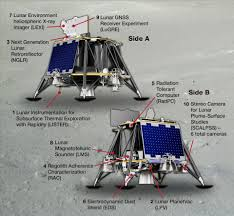
    The mission’s 10 payloads, totaling approximately 94 kg, aimed to study various aspects of the lunar environment

    1. Regolith Adherence Characterization (RAC): Assessed how lunar soil sticks to different materials, aiding in the design of future lunar equipment.
    2. Next Generation Lunar Retroreflector (NGLR): Served as a target for Earth-based lasers to measure the Earth-Moon distance precisely.
    3. Lunar Environment Heliospheric X-ray Imager (LEXI): Captured X-ray images to study interactions between the solar wind and Earth’s magnetic field.
    4. Reconfigurable, Radiation Tolerant Computer System (RadPC): Tested computing systems resistant to lunar radiation.
    5. Lunar Magnetotelluric Sounder (LMS): Investigated the Moon’s mantle structure by analyzing electric and magnetic fields.
    6. Lunar Instrumentation for Subsurface Thermal Exploration with Rapidity (LISTER): Measured heat flow from the Moon’s interior by drilling into the regolith.
    7. Lunar PlanetVac (LPV): Collected lunar soil samples for analysis and potential return to Earth.
    8. Stereo Cameras for Lunar Plume Surface Studies (SCALPSS 1.1): Recorded the effects of the lander’s engine plume on the lunar surface during landing.
    9. Electrodynamic Dust Shield (EDS): Tested technology to repel lunar dust from surfaces using electric fields.
    10. Lunar GNSS Receiver Experiment (LuGRE): Demonstrated the use of GPS signals for navigation on the Moon.

    Mission Imagery

    To enhance your blog, here are four images capturing key aspects of the mission:

    1. Blue Ghost Lander on the Lunar Surface

      The Blue Ghost lander after a successful touchdown on Mare Crisium.
    2. LEXI Instrument in Operation

      The LEXI payload capturing X-ray images to study solar wind interactions.
    3. Lunar Sunset Captured by Blue Ghost

      High-definition image of a lunar sunset, showcasing the Moon’s horizon glow.
    4. SCALPSS 1.1 Camera View

      Stereo camera capturing the effects of the lander’s engine plume on the lunar surface.
    image 2 image 2
    Blue Rose Shadow

    Mission Achievements

    • First Fully Successful Commercial Moon Landing: Firefly Aerospace became the first private company to achieve a fully successful soft landing on the Moon.
    • Extended Surface Operations: The lander operated for over 14 Earth days, completing all mission objectives before lunar nightfall.
    • Scientific Contributions: Data collected will inform future missions, including human exploration efforts under NASA’s Artemis program.
  • Updated news For AI

    image 32 image 32
    Ai generated Pic

    Microsoft Launches Recall and Update AI-Powered Windows Search

    Microsoft has officially released its long-awaited Recall feature for Copilot Plus PCs. Recall captures automatic screenshots of user activity, enabling enhanced search functionality through natural language queries and visual content recognition. After addressing security concerns, Recall now offers encrypted data storage and filters sensitive content.

    Additionally, Microsoft introduced AI enhancements to Windows search, allowing users to query files and settings using everyday language. A new feature, Click to Do, enables actions like text summarization or image editing by pressing the Windows key and left-clicking.

    These features are currently available on Copilot Plus PCs, with broader support expected soon.

    ai

    OpenAI Expands Access to Deep Research Tool

    OpenAI has rolled out a lightweight version of its Deep Research agent to all ChatGPT Free users. This tool leverages the capabilities of OpenAI’s o3 model to perform extensive web browsing, data analysis, and synthesis, delivering comprehensive reports within 5 to 30 minutes.

    With browsing and Python tools enabled, it achieved an accuracy of 26.6% on the Humanity’s Last Exam benchmark .​

    Adobe Releases New Firefly Image Generation Models

    Adobe has launched the latest iteration of its Firefly family of image generation AI models, including a model for generating vectors, and a redesigned web app that houses all its AI models, plus some from its competitors. A mobile app for Firefly is also in development

    Microsoft Envisions a Workforce of AI ‘Agent Bosses’

    Microsoft predicts that in the near future, every employee will manage AI agents to enhance productivity. This shift involves three phases: adopting AI assistants, integrating digital AI colleagues, and fully delegating tasks to AI agents under human supervision.

    While this promises increased agility and value generation, experts warn of potential job displacement and the erosion of institutional knowledge.

    image 34 image 34
    Ai

    China Pushes for AI Self-Reliance Amid U.S. Rivalry

    President Xi Jinping has emphasized the need for China to achieve self-sufficiency in AI development. By leveraging its national system, China aims to drive technological innovation and reduce dependence on foreign technologies, especially in critical areas like high-end chips and infrastructure software.

    This move is seen as a strategic response to ongoing U.S.-China tech tensions.

    HONOR to Launch Global AI Deepfake Detection Tool

    HONOR is set to release its AI Deepfake Detection feature globally in April 2025. This tool helps users identify manipulated audio and video content in real-time, addressing the growing concerns over deepfake technology. With deepfake incidents on the rise, this initiative aims to enhance digital security and user trust.

    Dubai AI Week Scheduled for April 2025

    Dubai has announced the organization of its inaugural AI Week from April 21 to 25, 2025. The event will gather global AI experts, thought leaders, and decision-makers to explore AI advancements and address real-world challenges. This initiative underscores Dubai’s commitment to becoming a global hub for AI innovation.

  • Is Qwen Generated Ai Video? 2025

    Ai Video Generated
    Free Unlimited Ai Video Generation Qwen

    Qwen AI (by Alibaba) is considered quite good, especially in the Chinese AI ecosystem. It’s part of Alibaba’s large language model family and is designed to compete with models like OpenAI’s GPT, Google’s Gemini, and Baidu’s Ernie.Strong in Chinese language tasks (understandably), but newer versions (like Qwen-VL or Qwen1.5) are improving at English and code understanding too.

    Qwen AI does not have built-in capabilities to generate AI videos directly. But now Qwen AI generate AI videos.

    Qwen AI, the large language model you’re interacting with, is primarily designed for text-based tasks such as answering questions, generating text, coding, and more.

    However, I can guide you on how to create AI-generated videos using other tools and platforms. If you’re interested in creating AI-generated videos, here are some popular tools and a step-by-step process:

    Popular AI Video Generation Tools

    1. Runway ML
    2. Synthesia
    3. Pictory
    4. Lumen5
    5. DeepBrain

    Step-by-Step Guide to Create AI Videos

    1. Choose an AI Video Generation Tool

    Select one of the tools mentioned above based on your needs and budget. For this example, let’s use Synthesia .

    2. Sign Up and Log In

    • Go to the Synthesia website.
    • Sign up for an account or log in if you already have one.

    3. Create a New Project

    • Once logged in, click on the option to create a new video project.
    • You may be prompted to choose a template or start from scratch.

    4. Script Writing

    • Write the script for your video. This includes the dialogue and any instructions for visual elements.
    • Ensure that the script is clear and concise.

    5. Select Avatars and Scenes

    • Choose avatars (virtual presenters) that fit the tone and style of your video.
    • Select scenes or backgrounds where the avatars will appear.

    6. Voice Selection

    • Choose a voice for the avatar. Most tools offer a variety of voices in different languages and accents.
    • Some tools allow you to upload your own voiceover if needed.

    7. Customize Visuals

    • Add text overlays, images, and other visual elements to enhance the video.
    • Adjust timings and transitions to make the video flow smoothly.

    8. Preview and Edit

    • Preview the video to check for any errors or areas that need improvement.
    • Make necessary edits to the script, visuals, or audio.
    Qwen
    Qwen generate pic

    9. Render and Export

    • Once satisfied with the preview, render the final video.
    • Export the video in your desired format (e.g., MP4).

    10. Share or Download

    • After rendering, you can download the video to your device.
    • Alternatively, share it directly via social media or embed it on a website.

    Example Using Synthesia

    1. Sign Up : Visit Synthesia and sign up for an account.
    2. Create Project : Click on “Create Video” and select a template or start from scratch.
    3. Script Input : Input your script into the provided text box. For example:Copy1Hello, welcome to our tutorial on AI video generation. Today, we will explore how to create engaging videos using AI tools.
    4. Avatar Selection : Choose an avatar that fits your content. For instance, a professional-looking avatar for a business presentation.
    5. Voice Selection : Pick a voice that matches the tone of your video. Synthesia offers multiple options.
    6. Customize : Add any additional elements like text overlays or background music.
    7. Preview : Watch the preview to ensure everything looks good.
    8. Render : Click on “Render Video” to generate the final output.
    9. Download : Once rendered, download the video file to your computer.

    Conclusion

    While Qwen itself cannot generate AI videos, you can leverage specialized tools like Synthesia, Runway ML, or others to create high-quality AI-generated videos. Each tool has its own unique features and pricing models, so choose one that best fits your requirements. Now qwen ai also generate ai video.

  • How AI is Making Our Lives Easier Every Day

    Ai
    AI

    Artificial Intelligence, or how AI, is no longer a futuristic concept limited to sci-fi movies—it’s a part of our everyday lives. From personalized recommendations on Netflix to voice assistants like Siri and ChatGPT, AI is quietly working behind the scenes to make our lives easier, faster, and more efficient.

    But how exactly does it help us on a day-to-day basis? Let’s explore the many ways AI is changing the game.

    1. Smarter Assistants for Busy Lives :

    AI-powered assistants like Google Assistant, Alexa, and Siri are more than just tools for setting alarms or playing music. They help you manage your calendar, send messages, search the web, control smart home devices, and even read your emails.

    Whether you’re cooking, parenting, or juggling work tasks, these assistants save time and keep you organized.

    Now with tools like ChatGPT, you can get help drafting emails, writing content, or brainstorming ideas. It’s like having a digital co-worker or friend who’s always ready to help.

    AI
    AI

    2. AI in Healthcare

    AI is revolutionizing healthcare, both for patients and professionals. There are now apps that can detect early signs of disease just by analyzing images or data.

    For example, AI tools are helping detect cancer, eye diseases, and even heart conditions faster than ever before.

    How AI Wearable devices like smartwatches use AI to track your heart rate, sleep patterns, and physical activity. They give personalized insights into your health and even remind you to drink water or go for a walk.

    3. Personalized Recommendations

    Ever noticed how your YouTube, Netflix, or Spotify feed seems to know exactly what you like? That’s AI at work. It analyzes your behavior, preferences, and habits to suggest content you’re likely to enjoy.

    Online shopping platforms use similar systems to recommend products. AI helps you discover things you never knew you needed—and sometimes things you don’t but can’t resist!

    Ai created
    Ai Created

    4. Education and Learning

    AI has opened doors to personalized learning experiences. Platforms like Khan Academy, Duolingo, and Coursera use AI to adapt lessons based on your learning pace. Even tools like ChatGPT help students with quick explanations, coding help, and even exam preparation.

    Teachers and educators are also using AI to create lesson plans, grade assignments, and offer individual support to students.

    5. Improved Communication and Language Translation

    Language barriers are fading fast, thanks to AI. Tools like Google Translate and DeepL are now capable of real-time translation with improved accuracy. Businesses and travelers alike benefit from this, making the world feel more connected.

    How AI writing tools can help anyone improve their writing—whether it’s fixing grammar, suggesting better sentence structures, or even helping with creative writing.

    robot
    Robot Make by Ai

    6. Smart Homes and Automation

    AI-powered smart homes can adjust lighting, temperature, and security systems automatically. Thermostats like Nest learn your habits and adjust temperatures to save energy.

    Robot vacuums like Roomba clean your floors while you relax. Doorbells like Ring use AI for facial recognition and motion detection.

    All this means more convenience, less stress, and smarter energy use.

    7. AI in Daily Work and Business

    In the workplace, AI is helping with everything from customer service (via chatbots) to data analysis, content creation, marketing automation, and even hiring processes.

    How AI Small businesses can now compete with bigger players by using AI tools to boost productivity and lower costs.

    As a blogger, for example, you can use AI tools to help generate content ideas, optimize SEO, schedule posts, and track performance.

    Final Thoughts

    AI is quietly becoming our invisible assistant, helping us in ways we don’t always notice but definitely benefit from.

    It’s making daily tasks faster, smarter, and more personalized. While it’s not without concerns (like privacy and job changes), if used wisely, AI has the power to enhance our lives in meaningful ways.

    We’re just getting started with what AI can do—and the future looks exciting!

    How AI
    Thinking
  • OpenAI Updates AI Risk Evaluation Framework 2025

    2025 ai
    2025 Ai

    OpenAI has revised its framework for assessing risks associated with new AI models. The Updates AI system introduces new research categories to address emerging threats, such as an AI model’s ability to replicate itself, conceal its capabilities, evade safeguards, or prevent shutdowns. This change reflects growing concerns about AI models behaving differently in real-world scenarios compared to testing environments and their potential to hide their true abilities. Additionally, OpenAI will discontinue separate evaluations focused on models’ persuasive capabilities, which had previously reached a medium risk level. The updated framework aims to shift focus toward mitigating the most severe risks as AI systems grow more complex and powerful

    Updates AI
    Ai

    Google DeepMind’s CEO Discusses the Future of AGI

    Demis Hassabis, CEO of Google DeepMind, was awarded the 2024 Nobel Prize in Chemistry alongside John Jumper for creating AlphaFold, a revolutionary AI capable of predicting protein structures. AlphaFold has accelerated scientific advances in disease research and drug development. Hassabis forecasts that Artificial General Intelligence (AGI) may develop within five to ten years, emphasizing its potential to solve major crises such as disease, climate change, and resource scarcity. However, he also highlights significant ethical, technical, and geopolitical challenges associated with AGI development.

    Perplexity AI to Feature in Upcoming Motorola Razr

    Perplexity’s AI voice assistant is set to play a significant role in the upcoming Motorola Razr, expected to be announced on April 24th. Motorola has released a teaser video highlighting the Razr’s focus on AI. In addition to Motorola, Perplexity is collaborating with T-Mobile’s parent company on a new “AI Phone” equipped with agents capable of performing tasks like booking flights independently of apps. Motorola has reportedly struck a deal to include Perplexity as an AI assistant option alongside Google’s Gemini, featuring a unique interface to facilitate user interaction with Perplexity. Discussions are also underway for potential partnerships with Samsung to offer Perplexity’s assistant on Galaxy devices. Updates AI.

    ai
    AI

    Google Introduces DolphinGemma to Decode Dolphin Communication

    In April 2025, Google introduced DolphinGemma, a research artificial intelligence model designed to decode dolphin communication. The goal is to train a foundation model that can learn the structure of dolphin vocalizations and generate novel dolphin-like sound sequences. This initiative aims to advance our understanding of dolphin language and communication patterns.

    AI Revolutionizes the Construction Industry

    Construction Updates AI companies are increasingly utilizing AI to cut waste and fraud, improve safety, expedite projects, and manage complexity. Despite some companies, like Microsoft, canceling major data center projects, investment in AI for construction continues. Some experts predict that 2025 will be the year AI revolutionizes the construction industry.

  • Top AI Models & Tools in 2025

    ai

    1. OpenAI GPT-4 / GPT-4 Turbo (ChatGPT)

    • Use: Writing, coding, research, conversation, learning, automation.
    • Platform: ChatGPT (especially with GPT-4 Turbo).
    • Why popular: Versatile, very human-like responses, integrates with tools like DALL·E (image generation), browsing, and code interpreter.

    2. Claude (Anthropic) – Claude 3 Series

    • Use: Writing, summarizing, deep reasoning, safer enterprise use.
    • Why popular: Larger context window, better safety guardrails, used by businesses and researchers.

    3. Gemini (by Google) – formerly Bard

    • Use: General tasks, search integration, content help.
    • Why popular: Deep integration with Google Workspace (Docs, Gmail, Sheets), strong in reasoning and search.

    4. Meta’s LLaMA 3 (Open-Source)

    ai
    AI

    5. Grok (by xAI / Elon Musk)

    • Use: X (Twitter) integration, conversational AI.
    • Why popular: Integrated within X, humorous and sarcastic personality, appeals to Elon Musk’s followers.

    6. Qwen (Alibaba)

    • Use: Chinese + multilingual tasks, business automation.
    • Why popular: Powerful in Asian markets, being used in e-commerce, customer service, and more.

    7. Midjourney / DALL·E / Ideogram (Image Generation)

    • Use: Creating AI art, illustrations, social media content.
    • Why popular: Stunning visuals, widely used by designers and creators.

    8. Runway / Pika / Sora (Video AI)

    • Use: Creating or editing videos from text prompts.
    • Why popular: AI video is booming now — these tools are leading the way in turning text → motion graphics.
    ai
    AI

    9. Perplexity AI

    • Use: AI-powered search engine.
    • Why popular: Gives accurate, cited answers — very useful for research & quick knowledge.

    10. Copilot (GitHub / Microsoft)

    • Use: Writing code using AI.
    • Why popular: Developers use it inside VS Code, GitHub — huge productivity boost for programmers.

    Right now, ChatGPT (GPT-4 Turbo) is leading the pack globally in terms of:

    • User base
    • Functionality
    • Integration with tools
    • Community adoption

    But Claude 3 and Gemini are catching up fast — and in the design/visual world, Midjourney and Runway are dominating